

On Behalf of Security: How SAP Basis Automation Helps Boost Efficiency and Resilience in SAP System Operations




When a user leaves the company, their system access/account is supposed to be deleted on Day X. However, this isn’t always guaranteed. The same goes for the periodic change of passwords—it doesn’t happen reliably. Then there’s the implementation, consideration, and review of so-called SAP Security Notes, or SAP Sec Notes for short. This is immensely important; without specialized software, handling these critical Sec Notes becomes problematic. One final example, which is becoming increasingly significant: SAP certificate management and IT certificate management in general, which becomes increasingly complex when implemented manually or semi-manually because the intervals between certificate renewals are shrinking dramatically. A single overlooked certificate change can slow down or even halt business operations—resulting in corresponding revenue losses.
Security and resilience in SAP deployments are much more important today than they were perhaps ten years ago. For companies, this poses a major challenge because the topic is multifaceted and involves a great many subtopics. When looking at the SAP infrastructure, the list of issues remains extensive. In addition to security, there are a wide variety of maintenance-related issues to consider. Within companies, responsibility for these matters typically falls to SAP Basis or SAP infrastructure teams, occasionally to compliance departments, or—at the management level—to IT management and CIOs.
SAP System Operations Changes
It has long been the case that CIOs focus on cost optimization in both the overall deployment of SAP and the associated SAP system operations. However, they are urged not to lose sight of risk prevention, business continuity, human resources management, and other areas.
There is an increasing reliance on automation software in the form of suites that cover multiple areas of activity. These are managed from a central location as a central point of management. These suites include several apps that have been proven to effectively support SAP Basis tasks and activities. For example, one user reports time savings of about 70 percent compared to conventional methods when creating automated SAP system copies using the standard process.
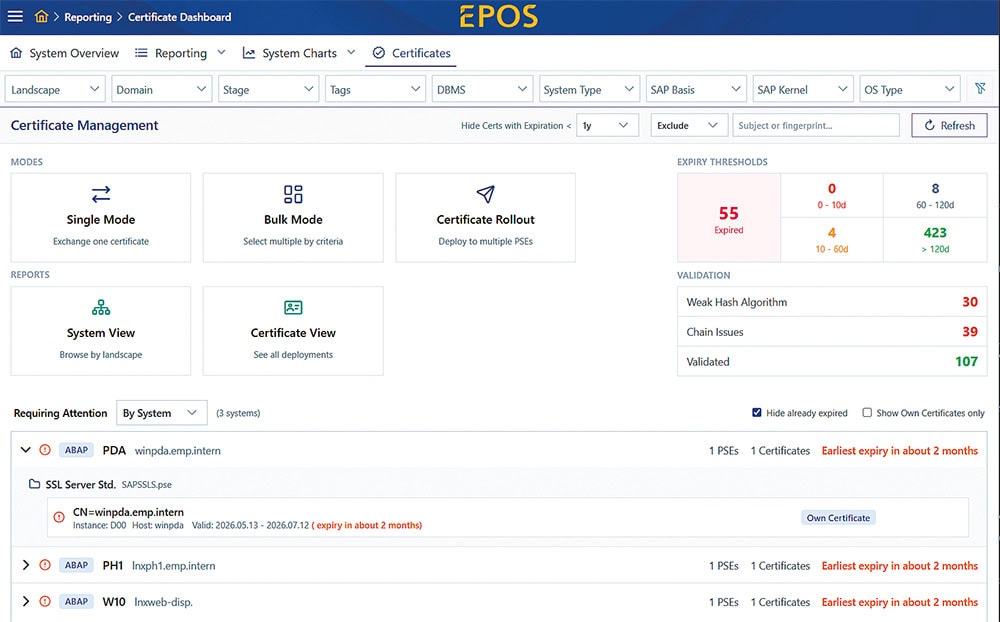
When it comes to security and automation, two distinct aspects must be considered. First, the level of resilience increases significantly for the SAP Basis system—and thus also for the SAP user company. The main reason: processes run at a consistently high level of quality based on best practices; at the same time, it is impossible for a process to be overlooked, for whatever reason. In addition, reporting provides a comprehensive and detailed overview of the SAP system operating environment and status. This is often lacking in manual or semi-manual approaches. On the other hand, the focus is on the use of individual apps within an SAP Basis automation suite. Here, too, best-practice processes are effective and provide assurance. Added to this are benefits in specific areas of security app usage, such as the management of SAP Sec Notes or SAP certificate management. It is becoming increasingly clear that automated SAP certificate management, in particular, is taking on ever greater importance.
Compulsion to Act
The crux of the matter for users here: Certificate authorities dictate significant reductions in the validity periods of certificates. In a few years, certificates will have to be replaced every 47 days. Expired or invalid certificates mean that business-critical SAP application systems—as well as non-SAP systems—will be taken offline. Many SAP and other IT systems communicate with each other and verify certificates in the background. If even one certificate has expired or is no longer up to date, problems are inevitable. Analysts even warn of a certificate-induced system shutdown leading to a wave of bankruptcies. Automation plays a crucial role in certificate management. As certificate validity periods are shortened, automation protocols are also mandated; without automation, certificate management becomes a time-consuming endeavor. A sophisticated SAP Certificate Management app—which will eventually support non-SAP systems as well—ensures that the certificate trap is avoided.
First and foremost, such an app should be designed to address the specific needs of SAP applications and take SAP’s unique characteristics into account. All certificates related to or relevant for SAP should be clearly and comprehensively displayed using a dashboard. Of course, it must show which certificates are set to expire and need to be renewed, and when. And when a renewal is carried out, it must indicate which old certificates need to be deleted.
An app that automatically handles various steps and phases based on best-practice workflows and guides the app user through the processes. This includes, for example, the automatic generation of certificate signing requests, the verification and installation of certificates, and the chaining of primary, intermediate, and root certificates. Despite automation, mechanisms should be in place to manually intervene in the processes flexibly, correct processes or workflows if necessary, or retrieve completed jobs at any time for review. It should not matter whether you are dealing with 5, 50, 500, or more certificates. Whether they are apps for SAP Certificate Management, SAP Security Notes Management, SAP User Admin Management, or apps for maintenance tasks such as updates to databases, operating systems, or the SAP kernel—all apps in an SAP Basis automation suite always have two primary goals: to increase security and resilience, and to improve efficiency while achieving time and cost savings as well as cost optimization.
To the partner entry:


 Deutsch
  English
  Español
  Français